
How to improve your office posture for healthy living
Table of contents
- 5 rules for good office posture.
- Most frequent posture mistakes at the office.
- How to improve posture and office ergonomics when sitting.
- How to improve posture and office ergonomics when standing.
Thorough my healthy living journey, I have learned to create an almost perfect workspace. But It took me some back issues to learn the importance of keeping a good posture.
The health hazards of sitting down all day are no joke, and sitting is the new “C”. And most of us spend most hours of the day at the office. Thus, ergonomics are really important for health and wellness.
After multiple chiropractor visits, some research, and trial and error, I have created a proper home office in a budget. I have the details at the end if you are interested on my home office setup.
5 rules for good office posture
When It comes to office ergonomics, there are 5 things that you need to pay attention, the biggest lessons I have learned, and now consider the base of proper posture and office ergonomics is that if you are mindful of the following things, your body will thank you.
- Keeping an engaged core
- Straightening the spine
- Placing arms at the right angle
- Rolling the shoulders back
- Resting feet appropriately.
Very simple! now try practicing, all day long 😉
Because I have already done all the heavy lifting, I think I can help someone else to set up a proper home office, and most of all get the tips and tricks to maintain the good habit of seating properly. Think of this as a transition, a period of swapping bad habits for good ones.
If you are suffering the side effects of working on a less than appropriate office space, whether is at the office or at home, I am going to tell you everything that has worked for me to solve my bad posture.
Most frequent posture mistakes at the office
It took trial and error but also awareness to swap old habits, I was ignorant of all the common mistakes that were contributing to my back pain. I worked with my chiropractor on evaluating my habits and pinpointing what I was doing wrong, she told me that basically 80% of people are inadvertently doing similar things.
So here is the list of common ergonomic mistakes that were causing my discomfort at the office, I unveiled it a couple of years ago, I hope it helps you, are you doing any of these things?
- Rounding the spine: I was rounding my spine because my seat had a soft cushion that did more harm than good.
- Prolonged sitting: I was spending 10+ hours Sitting, no wonder my back was stiff…
- Unsupported lower back: I wasn’t using proper lumbar support and my lower back was not happy.
- Crossing legs: turns out sitting down like a lady is not so great for your health, evidently it created an imbalance in the pelvis and a strain on on my lower back. So why did they push this as “good manners” in young ladies…
- Leaning forward: I used to lean forward a lot when using the large screens. This one is still tricky…
- Not taking breaks: I was sitting all day without stretching or moving around.
So after interiorizing my bad habits, it was time to swap them. The first thing that I did, was to get organized. I got rid of useless accessories like my bad cushion and upgraded some key elements.
How to improve posture and office ergonomics when sitting on your desk
Today, my back no longer hurts, and I feel less tired at the end of the day. Good posture is life changing, it prevents injury, and it also helps you feel more energized and confident.
Here are some of the things that I have done though the past 2 years as to improve my posture and office ergonomics. It has been an interesting journey and I hope you can learn from the things that have worked for me, at least give it a try and if it’s not for you, discard it later, but try it for a week, here is my life changing list:
- I make sure I sit all the way back on my seat, with my feet flat, on the floor and my knees at a 90-degree angle. The trick is to make sure that both desk and chair are at the appropriate height.
- I Keep the hips slightly higher than my knees and my feet on the floor. I stop crossing the legs or putting my feet up.
- I have a chair with appropriate lumbar support. And in addition a rollout cushion for longer days to support my lower back which is the main issue.
- I keep the elbows at a 90-degree angle when typing. Again set both desk and chair at the appropriate height.
- I have multiple screens, so I had to reorganize my desk space to keep all the monitors at eye level.

In addition, I try to take walking calls when it makes sense, I refill my water more often and I have also upgraded to a standing desk. I try to sit for the first half of the day and then I usually work standing up in the afternoon.
How to improve posture and office ergonomics when using a standing desk
Here are some of my tips for keeping a good posture When using a Standing desk:
- Stand with your feet hip-width apart, type with your elbows at a 90-degree angle. Thus pay attention to the desk height.
- Engage your core muscles, avoiding slouching, and roll the shoulders back and the chin parallel to the floor (Not looking down to the phone)
- Keep your knees slightly bended to reduce joint strain, and Use an anti-fatigue mat to provide cushioning for your feet. The mat is really important.
- Alternate between standing and sitting throughout the day to avoid prolonged static postures.
- Keep your monitor at eye level and position it an arm’s length away.
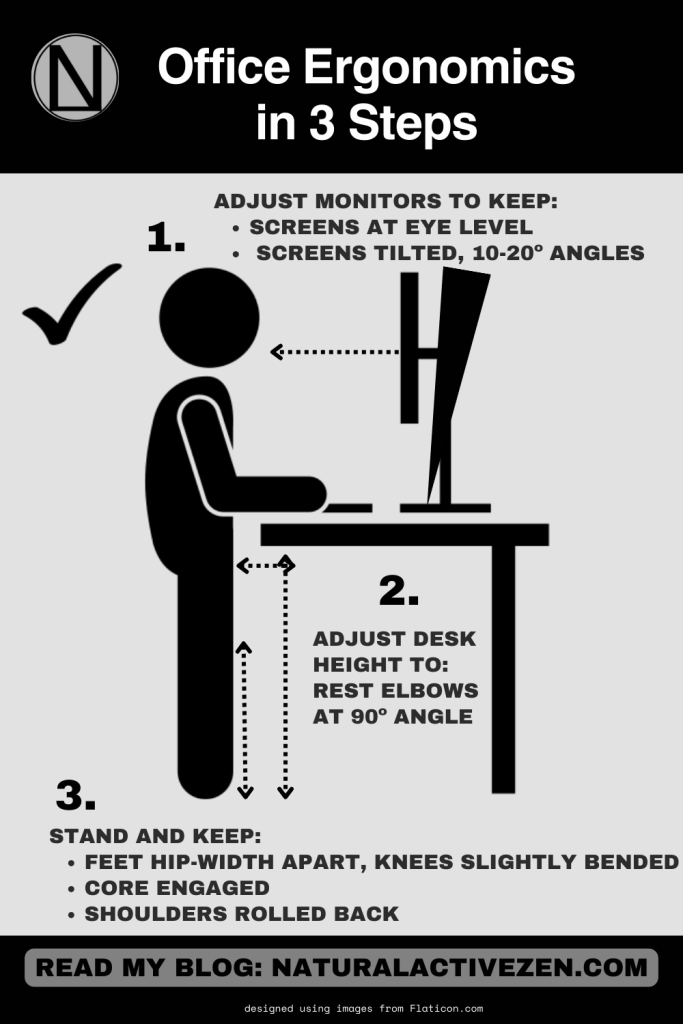
By implementing these tips and making small adjustments to your workspace, you can promote better posture and reduce the risk of discomfort or injury associated with prolonged sitting or standing. Remember to listen to your body and take regular breaks to move and stretch throughout the day. Let me know how it goes .

Finally, for your convenience here are the Amazon links to the 5 things that transformed my office, take a look:
Electric seating/standing desk, click here
Standing /feet pad, click here
Desk pad, click here
Massage pillow for some stressful days, click here
Ergonomic desk chair, click here

 Natural, Active, Zen, Lifestyle.
Leave a comment